A sit-stand desk converter is worth considering when your existing desk fits the room but its working height does not change. For most monitor-and-keyboard setups here, the FLEXISPOT 91.5cm is the strongest starting point: it has a separate keyboard tier, a broad top and a lift that stays within its footprint. The compact BONTEC is a different proposition for a laptop; the Ergotron needs substantially more desk depth and budget. Measure first—none is a cure for back pain or a substitute for changing position and taking breaks.
Our top 4 picks

Best for most two-tier setups — FLEXISPOT 91.5cm converter, white.
A wide surface, separate keyboard tray and vertical lift for a monitor-led desk.
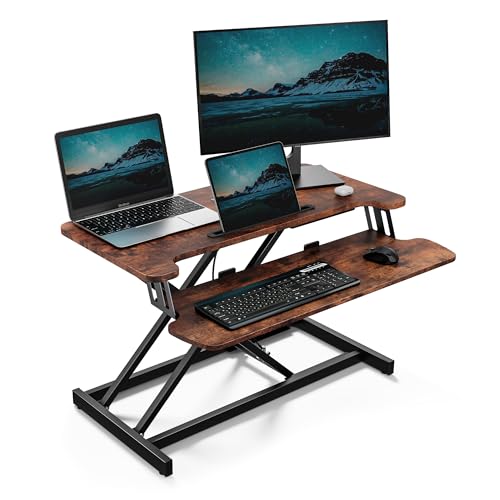
Best lower-cost two-tier pick — VonHaus 80 × 40cm converter, dark wood.
An 80cm top and keyboard shelf when you want to keep the footprint and spend down.

Best premium wide converter — Ergotron WorkFit-TL, black.
A 95cm platform and 38cm straight-up lift, but it needs a deep, sturdy desk.
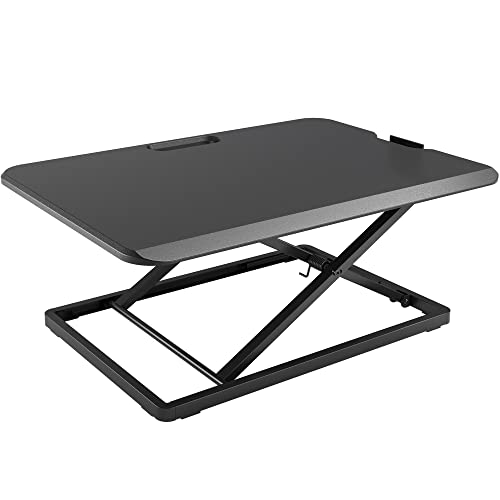
Best compact single platform — BONTEC 67 × 47cm converter, black.
A narrower riser for a laptop or light setup; no separate lower keyboard tier.
In this guide
- Comparison at a glance
- The four converters reviewed
- How to choose for your existing desk
- Set up and use it well
- Converter or full standing desk?
- How we chose
- The bottom line
- Frequently asked questions
Comparison at a glance
| Exact variant | Top / format | Listed load | Best fit | Main compromise |
|---|---|---|---|---|
| FLEXISPOT 91.5cm, white | Wide two-tier; separate keyboard tray | 15kg top; 2kg tray | Most monitor-led home desks | White finish and sizeable footprint |
| VonHaus 80 × 40cm, dark wood | 80 × 40cm top; keyboard shelf | 15kg stated capacity | Lower-cost two-tier setup | Less top space than FLEXISPOT |
| Ergotron WorkFit-TL, black | 95 × 59cm footprint; keyboard tray | 4.5–18.1kg operating range | Deep desk and wide/heavier kit | Large, heavy and costly |
| BONTEC 67 × 47cm, black | Single platform; 8 height settings | 8kg stated capacity | Laptop or light compact setup | No separate keyboard tier |
Dimensions and capacities are manufacturer or current product-listing specifications for the exact variants linked below, not load or stability tests we performed. Check the full base footprint and the combined weight of your screens, arm and accessories before ordering. The work surface and the supporting desk are separate limits.
The four converters reviewed
1. FLEXISPOT 91.5cm converter, white: best for most two-tier setups
The FLEXISPOT has the most balanced layout of these four for a conventional monitor, keyboard and mouse. Its two tiers help you place the keyboard below the screen rather than raising everything to one level. The listed 12–50cm adjustment range and straight-up travel are useful where there is little space behind the desk. The top is rated to 15kg; the detachable keyboard tray has its own 2kg limit, so do not treat 15kg as one combined allowance for every part.
It is not automatically right for a shallow desk. Measure where the base will sit, where the tray projects towards you, and whether your screen can reach a comfortable height in both positions. Choose it for a largely fixed home-office setup rather than frequent room-to-room moves.
2. VonHaus 80 × 40cm converter, dark wood: best lower-cost two-tier pick
The dark-wood VonHaus has a stated 80 × 40cm upper platform, an attached keyboard shelf and a gas-spring adjustment from 11.5 to 51cm. That makes it a credible lower-cost route to a two-tier workstation, especially if you have one monitor or a compact pair. The stated 15kg capacity is a limit, not a recommendation to load every centimetre of its surface with screens.
The narrower top is its honest trade-off against the FLEXISPOT. Measure monitor stands, not just screen diagonals, and allow room for a mouse on the lower tier. If your existing desk is narrow, this is a more sensible first measurement than a 95cm premium converter.
3. Ergotron WorkFit-TL, black: best premium wide converter
Ergotron specifies a 95 × 59cm footprint, 38cm of straight-up lift and an operating load range of 4.5–18.1kg for the WorkFit-TL 33-406-085. Its 69 × 28cm keyboard tray sits about 11.4cm below the upper surface. Those are concrete reasons to consider it for two screens or a wider workstation—not an unsupported claim that it eliminates wobble in every setup. Ergotron’s WorkFit specification also says the underlying desk should be at least 61cm deep.
It is a heavy, expensive item, and the exact seller’s delivery, returns and collection terms matter more here than on a small riser. Check those terms before purchase, especially if you may need to return it after unpacking. Its capacity has a minimum as well as a maximum, so a very light laptop-only setup is not the intended use.
4. BONTEC 67 × 47cm converter, black: best compact single platform
The BONTEC is a 67 × 47cm single platform with eight stated height settings and an 8kg load rating. It avoids a separate tray and fits a more compact desk. That simplicity suits a laptop or a light screen arrangement, but it cannot put a fixed keyboard lower than the screen by itself. If you work on a laptop for long periods, add a separate keyboard and mouse and check where they can sit at both heights.
Do not select it merely because its title mentions dual monitors. The listed 8kg limit and single 67cm surface are the useful constraints; weigh and measure your actual equipment first. For a full-size keyboard-plus-monitor setup, the two-tier products above are easier to plan around.
How to choose for your existing desk
Measure the desk and the equipment
- Desk footprint: measure unobstructed width and depth, including space for the keyboard tray to come towards you. The Ergotron specifically calls for a desk at least 61cm deep.
- Working load: add the weight of monitor stands, arms, laptop and accessories; use the stated limit for the correct tier. Check whether your desk itself can carry the converter plus equipment.
- Seated height: a converter adds height even when lowered. If your existing desk is already high, test whether your elbows and wrists can stay comfortable.
- Screen position: check eye level and viewing distance at both heights. A riser may still need a monitor arm or separate laptop accessories.
The HSE display-screen guidance covers workstation setup and regular changes in activity. It does not say that a standing converter by itself prevents pain. Our budget ergonomic home-office guide helps with chair and screen positioning around the converter.
Pick the lift, not the label
A gas-spring or counterbalanced platform can make height changes convenient, but ease of movement depends on the actual load and mechanism. Compare the range, load and footprint of the exact model, then picture the cable route as the platform rises. The FLEXISPOT here is manually adjusted; it has no motor or memory presets. Features from a different model do not carry over.
Set up and use it well

Place the converter on a flat, sound surface and follow its assembly and clearance instructions. Keep cables loose enough for full travel but away from the lift mechanism. After fitting the keyboard tray, move the unit slowly through its range with your actual equipment and check for monitor contact, cable tension and desk-edge overhang. Do not exceed either a tray limit or the base desk’s limit.
When seated, adjust the chair and screen rather than accepting a raised keyboard that forces your shoulders up. When standing, set the working surface for relaxed arms and avoid locking yourself into one position for hours. HSE recommends breaking up long spells of display-screen work with changes in activity; there is no universal “stand for 20 minutes every hour” prescription. Our guide to common standing-desk mistakes covers overreaching and screen placement.
Cable clutter increases when the surface moves. Keep power supplies on the fixed desk, and see our wireless charging setup guide if you want fewer loose leads on the moving tier.
Converter or full standing desk?
A converter preserves furniture you already like and usually changes a smaller part of the room. It also consumes some of the existing work surface, adds weight and can raise the seated screen position. A full height-adjustable desk gives you a single continuous surface and a wider choice of overall desk heights, but means replacing or moving your current desk. If you are furnishing from scratch, compare the full-desk route in our standing-desk guide rather than buying a converter by default.
A desk’s construction matters in either route. A large converter with two screens on a thin unsupported top deserves more scrutiny than the same load on a well-supported frame; our desk-materials guide explains the differences. Keep a suitable chair for seated work too—our desk-chair shortlist covers that half of the setup.
How we chose
We compared desk converters based on their dimensions, height adjustment, weight capacity, stability features and suitability for different workspaces. We also considered customer feedback, practical limitations and UK availability to identify options for different desk sizes, equipment setups and budgets.
Our recommendations are based on manufacturer specifications and available independent evidence rather than hands-on testing, with a focus on helping you choose a converter that fits your workspace and working needs.
The bottom line
Start with the FLEXISPOT 91.5cm if you need a broad two-tier surface on an existing home-office desk. Choose the VonHaus 80 × 40cm when you want a similar layout with a smaller footprint and lower current asking price. The Ergotron WorkFit-TL makes sense only if you have a deep, strong desk and enough equipment to justify its operating range and weight. The BONTEC is the compact, light-duty choice, not a substitute for a wide two-tier workstation. No converter fixes an unsuitable underlying desk or removes the need to move and take breaks.
Frequently asked questions
Is a sit-stand desk converter worth buying? It can be if you want to keep a suitable existing desk and change working height during the day. Measure the desk and equipment first; a converter does not guarantee relief from pain.
Which converter suits two monitors? Start by weighing both monitors and stands and measuring their combined footprint. The FLEXISPOT offers a wide two-tier layout; the Ergotron WorkFit-TL offers a larger 95 × 59cm footprint for a deep desk.
Do I need a separate keyboard tray? A lower tray helps separate keyboard and screen heights for a monitor setup. The FLEXISPOT, VonHaus and Ergotron here have one; the compact BONTEC is a single platform.
Will a converter fit a shallow desk? Not necessarily. Measure the full base depth and keyboard projection, not just the top width. Ergotron specifies an underlying desk at least 61cm deep for the WorkFit-TL.
Can I use a laptop on a standing desk converter? Yes, within the listed load and space limits. For prolonged laptop work, a separate keyboard and mouse can help place the screen and hands at different heights.
Does standing at a desk prevent back pain? No converter guarantees that. Set up the whole workstation comfortably and break up long spells of display-screen work with movement and changes in activity, as HSE advises.