A corner desk is worth buying when you need two working zones or want to use an awkward corner, but it is not automatically more space-efficient than a straight desk. The VASAGLE 140 × 80cm is the best overall choice here because its return is reversible and its storage is useful without making the footprint enormous. Choose an electric L-shaped desk only when you will genuinely change height across the whole workstation.
The key measurement is not the advertised width. It is the length and depth of both sides, the handedness of the return, and the chair space needed to move between them. A badly oriented L-shape can block a radiator, cupboard or window and make a small room feel tighter, so map the footprint before choosing a product.
In This Article
- Direct answer
- Comparison table
- Six corner desks
- Why corner desks work
- Pros and cons
- Best layouts
- What to look for
- Ergonomic setup
- Final verdict
- Frequently Asked Questions
Corner Desks: The Direct Answer
Buy a corner desk if you regularly switch between two tasks, run multiple monitors, need space for paperwork beside a keyboard or have a corner that a rectangular desk cannot use well. Keep a straight desk if the room is narrow, you move often or you want to face different directions without rebuilding the furniture.
- Small room: choose a reversible 100–120cm design and confirm the return depth.
- Permanent office: a 135–160cm model gives useful separation between screen work and writing.
- Sit-stand use: choose a purpose-built electric L-frame; two separate desks rarely rise evenly.
- Storage priority: drawers reduce leg clearance, so check where your knees and chair arms will go.
Corner Desks at a Glance
The table separates complete fixed desks from electric sit-stand models. Dimensions describe the selected product title; always verify the current variant before ordering because colours and sizes can sit on the same page.
| Desk | Best for | Layout | Key feature |
|---|---|---|---|
| VASAGLE 140 × 80cm | Best overall | Reversible | Drawers, shelves, power |
| FlexiSpot QS2 180 × 110cm | Best electric | Fixed return | Dual-motor sit-stand |
| VIVO 160 × 140cm | Best large sit-stand | Corner workstation | Electric three-leg |
| Lufeiya 120cm | Best compact | Reversible | Drawers and shelves |
| Vida Designs Hetton | Best budget | Fixed | Open shelves |
| ODK 135 × 100cm | Best with drawers | L-shaped | Storage-led |
Six Corner Desks for Different UK Rooms
1. VASAGLE 140 × 80cm — Best Overall

This is the strongest all-rounder because the return can be fitted on either side and the desk combines shelves, four drawers and integrated power without demanding the footprint of a full executive corner desk. The 140cm main side suits a monitor-led office, while the shorter return creates a useful writing or printer zone.
The compromise is visual and physical bulk: drawers and shelving make it less airy than a simple metal frame. Check the drawer side against your doorway, radiator and chair position before assembly.
2. FlexiSpot QS2 180 × 110cm — Best Electric

The QS2 is the right choice when the whole L-shaped surface must move between sitting and standing heights. Its four-leg, dual-motor arrangement supports a broad 180 × 110cm workstation with memory controls, making it better suited to a permanent dual-monitor office than a compact bedroom.
The top is described as spliced, and the large footprint leaves little tolerance for measuring errors. Confirm the return orientation, lowest height and route into the room before ordering.
3. VIVO 160 × 140cm — Best Large Sit-Stand
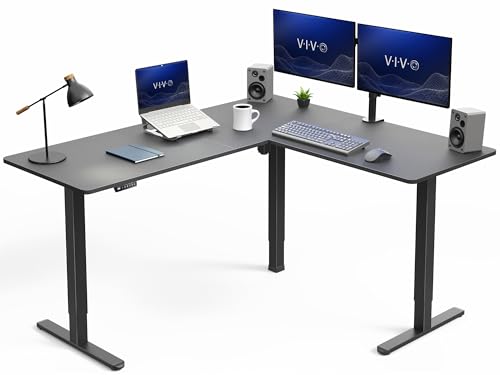
The VIVO gives a deeper second side than the FlexiSpot, which is useful when both wings need to function as proper work surfaces. It suits editing, music, drawing or any setup where equipment stays spread across the corner rather than being packed onto one main run.
A 160 × 140cm desk dominates a typical spare bedroom. Mark both wings and the chair sweep on the floor first, then check that screens can sit at a sensible distance from the corner seat.
4. Lufeiya 120cm — Best Compact

The Lufeiya is the sensible box-room option. Its reversible layout, fabric drawers, shelves and UK power outlet add utility without pushing the main side beyond 120cm. It works best for a laptop, one monitor and light storage rather than a heavy multi-screen workstation.
The smaller surface and lightweight storage are the trade-offs. Check monitor-stand depth and keep heavy equipment over the frame rather than loading the outer edge.
5. Vida Designs Hetton — Best Budget

The Hetton keeps the idea simple: a fixed corner surface with open shelves and no motors or elaborate electronics. It suits homework, occasional home working and a first desktop setup where low complexity matters more than premium adjustment.
Open shelves determine the handedness and reduce flexibility after assembly. Confirm which side holds the storage and whether your chair can approach the keyboard position squarely.
6. ODK 135 × 100cm — Best With Drawers
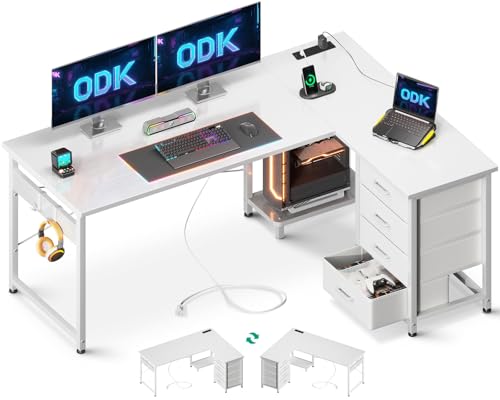
The ODK is the stronger storage-led choice for a medium room. Its 135 × 100cm footprint creates more surface than the compact Lufeiya, while drawers keep stationery and paperwork off the top.
Storage can create a knee-space problem if the return is on the wrong side. Measure the clear opening, not just the overall desk, and decide where the computer tower and monitor-arm clamp will sit.

Why Corner Desks Work in UK Homes
They Use an Awkward Wall Junction
A corner often cannot hold a wardrobe, door or full-depth cabinet, yet it can anchor two shallower desk runs. That is useful in spare bedrooms where the remaining walls contain a bed, window and radiator. The gain comes from using two directions, not from magic extra space.
They Create Two Working Zones
The main side can hold the screen and keyboard while the return carries paper, audio gear, a sewing machine or charging equipment. Keep the task used most often directly ahead; twisting repeatedly towards the return is worse than having a smaller straight desk.
The Real Pros and Cons of a Corner Desk
The Useful Advantages
- More surface within reach: two wings reduce the need for deep shelves.
- Clear task separation: computer work and paperwork can stay set up together.
- Better use of corners: awkward wall junctions become functional.
- Flexible orientation: reversible models can adapt to a future room.
The Drawbacks That Matter
- Dead corner: the far inside area is hard to reach and collects clutter.
- Harder moves: large tops and multi-part frames are awkward on stairs.
- Blocked walls: sockets, windows and radiators can become inaccessible.
- Limited rearrangement: a handed desk may work in only one position.
The best corner desk is therefore not the one with the biggest surface. It is the smallest footprint that creates the two zones you will actually use.
Best Corner Desk Layouts
Window to the Side
This is usually the strongest layout. Side light reduces direct screen glare while the return can run beneath or away from the window. Keep enough clearance for curtains, handles and ventilation.
Facing the Wall
A wall-facing main side is easy to cable-manage and keeps the screen out of the room. It can feel enclosed, so use the return to open towards daylight and avoid stacking tall storage at eye level.
Facing Into the Room
This works in a larger office and gives a better view of the door, but cables become visible and the rear edge needs finishing. It also consumes more circulation space.
What to Look For When Buying
Measure Both Wings
Tape the full L-shape on the floor and add the chair movement behind it. Include skirting boards, socket projections and window openings. Our monitor-size guide helps judge the depth needed for larger screens.
Check Handedness and Reversibility
“Reversible” should mean the return and storage can genuinely swap sides. Study the assembly diagram; product photos may show only one configuration.
Separate Load From Stability
A load claim does not describe movement at the outside corner or under a monitor arm. Frame geometry and a sound floor matter more. See our desk stability guide for the distinction.
Plan Cables Before Assembly
Mount the power strip beneath the main surface, leave slack for electric adjustment and keep connectors accessible. Our guide to useful desk accessories covers cable trays and clamps.
Making an L-Shaped Setup Ergonomic
Sit Square to the Main Screen
Place the primary monitor and keyboard directly in front of the chair, not diagonally across the inside corner. The HSE display-screen guidance supports assessing screen, keyboard, chair and work pattern together rather than treating the desk as a cure.
Use the Return for Secondary Work
Put occasional equipment on the return and swivel the whole chair when using it. Repeated neck twisting is a sign that the main task is on the wrong wing. For wider context, see our healthy desk-setup guide.
Final Verdict
Choose the VASAGLE 140 × 80cm for the best balance of useful surface, reversible orientation and storage. Choose Lufeiya for a box room, ODK when drawers matter, or Vida Designs for a simple fixed desk.
Choose FlexiSpot QS2 for a large permanent electric setup and VIVO when both wings need to be substantial. Do not buy either until the taped footprint, lowest working height, door route and cable plan all work in the actual room.
Frequently Asked Questions
Are corner desks good for small rooms?
They can be, when the two wings fit an otherwise awkward corner. Compact reversible desks are safer than large fixed-handed models.
Which side should the return be on?
Put it on the side that keeps doors, drawers, windows and radiators clear. For most people, the main monitor belongs on the longer side.
Is an L-shaped standing desk worth it?
Yes when you use both wings and change height regularly. A purpose-built electric frame is safer than trying to synchronise two separate desks.
Where should the monitor go?
Place the primary monitor directly ahead of the normal seated position. Use the return for secondary equipment or occasional tasks.
How deep should a corner desk be?
Around 60cm can suit a laptop or modest monitor, while larger screens are more comfortable with 70–80cm of depth.
Are reversible corner desks really reversible?
Many are, but storage, drawers or power modules may limit the alternative build. Check the assembly diagram for the exact variant.