The FLEXISPOT ErgoX Pro is the best desk chair under £500 here if you want the broadest adjustment range and have room for a substantial chair. The Hbada E3 Air and SIHOO B300 Pro suit people who prioritise responsive lumbar support, while the standard ErgoX is the more balanced mid-range choice. The ProtoArc EC200 makes sense for shorter-to-average users who need seat-depth adjustment; the Ticova is the budget pick.
Quick answer
Do not spend the full £500 merely because the budget allows it. A chair is valuable only when its seat height, seat depth, backrest and armrests fit both your body and your desk. Start with measurements, choose the adjustment you actually need, and keep the packaging until you have assembled and checked the chair.
None of these chairs can guarantee relief from back or neck pain. They provide adjustment and support, but comfort also depends on desk height, screen position, breaks and movement. Persistent pain, numbness or weakness deserves appropriate professional advice rather than a more complicated chair.
Contents
- Desk chairs compared
- Six chairs reviewed
- How to choose
- Fit the chair to your desk
- Frequently asked questions
Best desk chairs under £500 compared
| Chair | Best for | Budget position | Useful feature | Main compromise |
|---|---|---|---|---|
| FLEXISPOT ErgoX Pro | Best overall for adjustability | Premium | 250kg stated limit; adjustable seat depth | Large and heavy; check every dimension |
| Hbada E3 Air | Best for dynamic support | Premium | Dynamic lumbar; 140° recline | Complex adjustment and a sizeable frame |
| SIHOO B300 Pro | Best for responsive lumbar support | Upper mid-range | Adjustable seat depth and backrest | Many moving parts need careful setup |
| FLEXISPOT ErgoX | Best balanced mid-range chair | Mid-range | 6cm seat-depth range; 136kg stated limit | Headrest and lumbar shape will not suit everyone |
| ProtoArc EC200 | Best for shorter-to-average users | Mid-range | 33–43cm seat depth; four recline locks | Published fit guidance tops out around 185cm |
| Ticova Ergonomic Chair | Best budget choice | Budget | Adjustable lumbar, headrest and 3D arms | Foam seat and rocking mechanism are less refined |
The table is deliberately free of buying buttons so you can compare fit first. Product availability, colours and exact specifications can change by variant, so confirm the current listing before ordering. Stated weight limits are manufacturer figures, not proof that a chair will fit every person below that limit.
The six best desk chairs under £500
1. FLEXISPOT ErgoX Pro — best overall for adjustability

The ErgoX Pro leads because its useful adjustments cover the points that most affect fit: seat depth, lumbar position and arm support. Its lumbar unit can be moved through several positions, while the seat pan slides to support different thigh lengths. The mesh construction should feel cooler than a thick faux-leather executive chair during a long working day.
This is a broad, highly adjustable chair rather than a compact task chair. The stated 250kg limit is reassuring for larger users, but capacity alone says nothing about seat width, minimum height or desk clearance. Measure those dimensions and allow room for the armrests before choosing it.
- Buy it if: you want extensive adjustment and a reinforced chair for a larger frame.
- Skip it if: your office is small or you prefer simple controls.
- Main compromise: excellent adjustability in a bulky package.
2. Hbada E3 Air — best for dynamic support

The E3 Air uses a three-zone lumbar assembly designed to follow small posture changes rather than holding one fixed curve. Its headrest and armrests also offer several directions of adjustment, and the recline reaches a stated 140°. It suits somebody who changes position often and is willing to spend time tuning the chair.
More adjustment does not automatically mean a better fit. A pronounced moving lumbar system can feel supportive to one person and intrusive to another. Check the return terms, assemble it without discarding packaging, and try the work position before deciding whether the deeper recline matters.
- Buy it if: you like active lumbar contact and regularly shift between upright and reclined positions.
- Skip it if: you prefer a plain backrest or dislike learning multiple controls.
- Main compromise: responsive support with greater setup complexity.
3. SIHOO B300 Pro — best responsive lumbar option

The B300 Pro combines an independently adjustable backrest with a spring-assisted lumbar section and adjustable seat depth. That combination is more useful than a decorative headrest because it lets you position the back support and seat pan for your proportions. The weight-sensing recline also removes a separate tension-setting step.
The armrests and headrest move in several directions, which creates more possible fit points but also more places to knock out of position. Treat the manufacturer’s comfort language cautiously: the right setup should feel supportive without forcing the lower back or pushing the shoulders forward.
- Buy it if: seat depth and lumbar position are your two priorities.
- Skip it if: you want firm manual recline control or very simple armrests.
- Main compromise: useful adaptive mechanisms that need patient setup.
4. FLEXISPOT ErgoX — best balanced mid-range chair
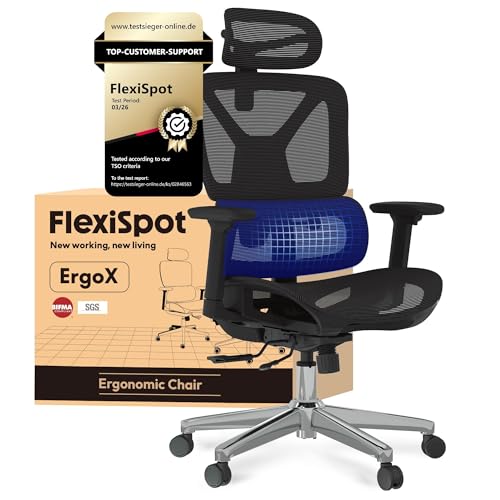
The standard ErgoX provides a 6cm seat-depth adjustment range, adjustable armrests, a headrest and a stated 136kg limit. It is the sensible middle of this list: more adaptable than a basic foam-seat chair, but less imposing and expensive than the Pro. The mesh seat and back should also suit warmer rooms.
The lumbar section follows the user rather than offering the same fine locking options as a conventional pad. That movement is personal: some people like continuous contact, others want support that stays put. Check the seat-height range against your lower-leg measurement and do not assume the headrest will land correctly.
- Buy it if: you want a full-mesh chair with meaningful adjustment around £200.
- Skip it if: you need a very wide seat or fixed, subtle lumbar support.
- Main compromise: strong mid-range value without the Pro model’s breadth.
5. ProtoArc EC200 — best for shorter-to-average users
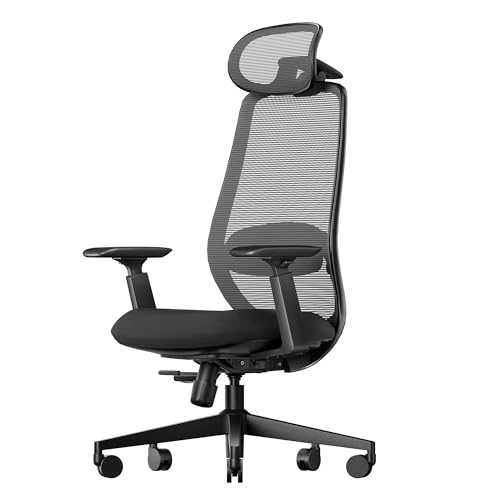
The EC200 is unusually clear about seat-depth adjustment: the published range is 33–43cm, with suggested user heights around 163–185cm. That makes it easier to assess than chairs described vaguely as ergonomic. It also offers four lockable recline positions, adjustable lumbar support, a headrest and adjustable arms.
A maximum 43cm seat depth is unlikely to give enough thigh support to many taller users. Anyone approaching or exceeding 185cm should compare it with our guide to office chairs for tall people. Published warranty and assembly claims should also be checked against the current seller and variant.
- Buy it if: you are within the stated fit band and want a compact adjustable seat pan.
- Skip it if: you have long thighs or need an especially broad seat.
- Main compromise: clear fit guidance, but a narrower body-size range.
6. Ticova Ergonomic Chair — best budget choice

The Ticova covers the main adjustments at a lower price: lumbar height and depth, headrest angle and height, 3D armrests, seat height and a rocking backrest. That gives it a better chance of fitting than a cheap fixed chair, and the foam seat may appeal to people who dislike sitting directly on mesh.
It is still a budget chair. The foam, controls and rocking mechanism are less sophisticated than those higher up this list, and the headrest or lumbar curve may not align with every body. The 130° figure describes the maximum rocking angle, not a promise that every position locks.
- Buy it if: your budget is tight but you still need adjustable lumbar support and arms.
- Skip it if: you want a sliding seat pan or premium mesh mechanisms.
- Main compromise: plenty of adjustment, with more basic materials and control feel.
How to choose a desk chair under £500
Measure seat height and depth
Measure your current chair while wearing the footwear you normally use at the desk. Your feet should be supported and there should be a small gap behind the knees. Seat-depth sliders are valuable when several people share a chair or when fixed seats have felt too short or too deep. For a complete low-cost setup, see our guide to setting up an ergonomic home office on a budget.
Choose lumbar support you can tolerate
Large adaptive lumbar pads create obvious contact; simpler mesh curves feel subtler. Neither style is universally better. Support should meet the lower back without forcing you forward. The Health and Safety Executive’s workstation guidance emphasises adjustment, support and changing position rather than one supposedly perfect posture.
Check armrests and desk clearance
Armrests should support relaxed shoulders without preventing the chair from reaching the keyboard. Measure the space beneath the desktop and between drawer units. Flip-up or highly adjustable arms help in a compact room, but loose multi-direction arms can be irritating if you frequently push against them.
Treat headrests and footrests as optional
A headrest matters mainly when reclining; it should not push the head forward during normal typing. A built-in footrest adds bulk and is not a substitute for proper foot support. If the desk height causes the mismatch, a suitable height-adjustable standing desk may solve more than another chair feature.
Check support and returns
Heavy chairs are awkward and expensive to return. Confirm who sold the exact variant, how replacement parts are handled, whether disassembly is permitted and what condition the packaging must be in. A familiar brand name does not guarantee that every marketplace seller provides the same support.
Fit the chair to your desk
Set the seat height first, then depth, lumbar support and armrests. Bring the chair close enough that you can reach the keyboard without leaning. Place the screen so you are not repeatedly tilting your head, and change position during the day. If your chair is correctly raised but your thighs hit the desktop, the desk—not the chair—is now the limiting component.
A shelf or monitor riser should not be used blindly to chase a fashionable screen height. Our guide to choosing a desk shelf or riser explains how depth, monitor stands and usable work surface interact. If you use a sit-stand desk, avoid the common standing-desk setup mistakes, particularly leaving the screen and keyboard at one compromise height.
Give any new setup a few working sessions, but stop if it causes numbness, sharp pain or worsening symptoms. A chair can support a sensible workstation; it cannot diagnose or treat a health condition.
Frequently Asked Questions
Is £500 enough for a good office chair?
Yes. This budget includes chairs with adjustable seat depth, lumbar support and arms. Fit and after-sales support matter more than spending the full amount.
Which chair is best for a tall person?
The FLEXISPOT ErgoX Pro is the strongest option here for a larger frame, but measurements matter more than its weight rating. Compare seat height, depth and width with your body and desk.
Is mesh better than a foam seat?
Mesh normally feels cooler and distributes pressure differently; foam can feel softer initially. Neither is automatically more comfortable, so consider room temperature, clothing and preferred firmness.
Do I need a headrest?
Not necessarily. A headrest is mainly useful during recline. It should adjust away from the head during upright work if it pushes the neck forward.
Can an ergonomic chair fix back pain?
No chair can guarantee that. Adjustment, workstation fit, movement and breaks may improve comfort, but persistent or worsening pain requires appropriate professional advice.
Should I buy a refurbished premium chair instead?
A reputable refurbished chair can be good value, but check the exact model, age, replaced parts, warranty and return terms. Refurbished condition varies more than a model name suggests.
The bottom line
Buy the FLEXISPOT ErgoX Pro if you want the widest adjustment range and have room for it. Choose the Hbada E3 Air or SIHOO B300 Pro for responsive lumbar systems, the standard ErgoX for balanced mid-range value, the ProtoArc EC200 for a smaller fit range, and the Ticova when budget matters most. Whichever you choose, body and desk measurements are more useful than an “ergonomic” label.