The best New Year home office organisation tips are not about buying prettier boxes. For a UK home worker, new year office organisation is really about making your desk easier to start using on a grey January morning, easier to tidy at 5pm, and harder to let drift back into the same cable-and-paper swamp by February.
In This Article
- New Year Office Organisation UK: Start With a Reset, Not a Shopping List
- Split Your Desk Into Work Zones
- Fix Cables and Power Before You Rearrange Everything
- Build a Paper and Admin System You Will Actually Use
- Choose Storage That Matches Your Room
- Clean Up the Digital Mess Too
- Low-Cost Organisation Buys Worth Considering
- Keep It Organised After January
- Frequently Asked Questions
New Year Office Organisation UK: Start With a Reset, Not a Shopping List
Most home offices get messy because they are asked to be too many things at once: work desk, charging station, filing cabinet, parcel depot, school-form landing strip and occasional dining table overflow. Before you buy anything, spend 20 minutes working out which jobs the room actually needs to handle this year.
The useful question is simple: what kept interrupting your work last year? If you were always hunting for a charger, that is a cable problem. If paperwork lived in piles because the filing box was in another room, that is a workflow problem. If your desk looked tidy but your Downloads folder had 400 files in it, the mess was digital, not decorative.
Do a three-pile reset
Clear the desk properly once, even if it looks worse for half an hour. Sort everything into:
- Daily use: laptop, keyboard, mouse, notebook, current charger, water bottle and anything you touch most working days.
- Weekly use: headset, external drive, label maker, spare stationery, receipts waiting to be processed.
- Not office work: parcels, old post, children’s craft bits, random Allen keys, dead pens and items that only live there because nobody challenged them.
Daily-use items earn desk space. Weekly-use items need nearby storage. Everything else leaves the room or gets a clearly labelled holding box by the door for one week only. After a week, if you have not needed it, it does not deserve premium office space.
This is where a lot of tidy-office advice goes soft. A neat pile is still a pile. If you move five piles into five baskets without deciding what each one is for, you have only bought nicer clutter.
Use the HSE checklist as a reality check
Organisation should not make the workstation worse to use. The HSE display screen equipment workstation checklist covers the practical risk factors around screens, keyboard, mouse, furniture and the work environment. You do not need to turn your spare room into a corporate risk assessment, but it is a useful reminder that tidying should not push your monitor too high, your keyboard too far away, or your mouse into an awkward corner.
I like doing this before buying storage because it protects the working position. Your laptop stand, chair, monitor and keyboard position matter more than whether the pen pot matches the desk mat. If you need a refresher on the core setup, the existing ergonomic desk setup checklist is the better place for posture detail; this article is about keeping the office usable once the basics are in place.
Split Your Desk Into Work Zones
A desk stays organised when every regular object has a reason to be where it is. The easiest way to do that is to divide the surface into zones, even if you never mark them physically.
The centre zone is for active work
The middle of the desk should hold the keyboard, mouse, notebook and current drink. That is it. If you use a monitor, keep the area directly in front of you clear enough that your arms can move without nudging piles of paper. A large desk mat can help here because it creates a visual boundary. Felt and PU leather mats around 80 x 40cm usually cost £12-£25 on Amazon UK; premium wool felt mats from brands such as Grovemade or Orbitkey can run £55-£90, which is nice but not required.
This is also where many people overdo accessories. A desk shelf riser can look smart, but it is only useful if it lifts a monitor, hides a keyboard, or stores items you use daily. If you are tempted by one, read the desk shelf riser guide first rather than buying a wooden shelf because Instagram made it look inevitable.
Keep a charging zone off to one side
Put chargers, battery packs and earbuds on the side that matches your dominant hand or the nearest socket. A wireless charging pad is tidy if you actually use wireless charging; otherwise it becomes a small expensive coaster. Basic Qi pads cost about £10-£18, while multi-device stands from Anker, Belkin or Ugreen are more like £30-£80.
The important bit is not the charger. It is having one place where charging happens. I use a tiny tray for the bits that otherwise wander: USB-C cable, watch charger, spare earbuds tips, memory card reader. It stops the desk becoming a scavenger hunt.
If you already own a pad and it keeps slipping around, the guide to setting up a wireless charging pad on your desk covers placement and cable routing in more detail.
Create a leaving zone
Every home office needs a small area for things that must leave the room: post to file, parcels to return, receipts to scan, books to put back. This can be a single A4 tray, a magazine file, or a small basket near the door. Do not put it behind you on a high shelf. If it is annoying to reach, you will dump things on the desk instead.
The rule is one in, one out. If the leaving zone is full, you deal with it before adding more. That sounds strict, but it is much less painful than discovering six months of mystery paperwork under a monitor stand.
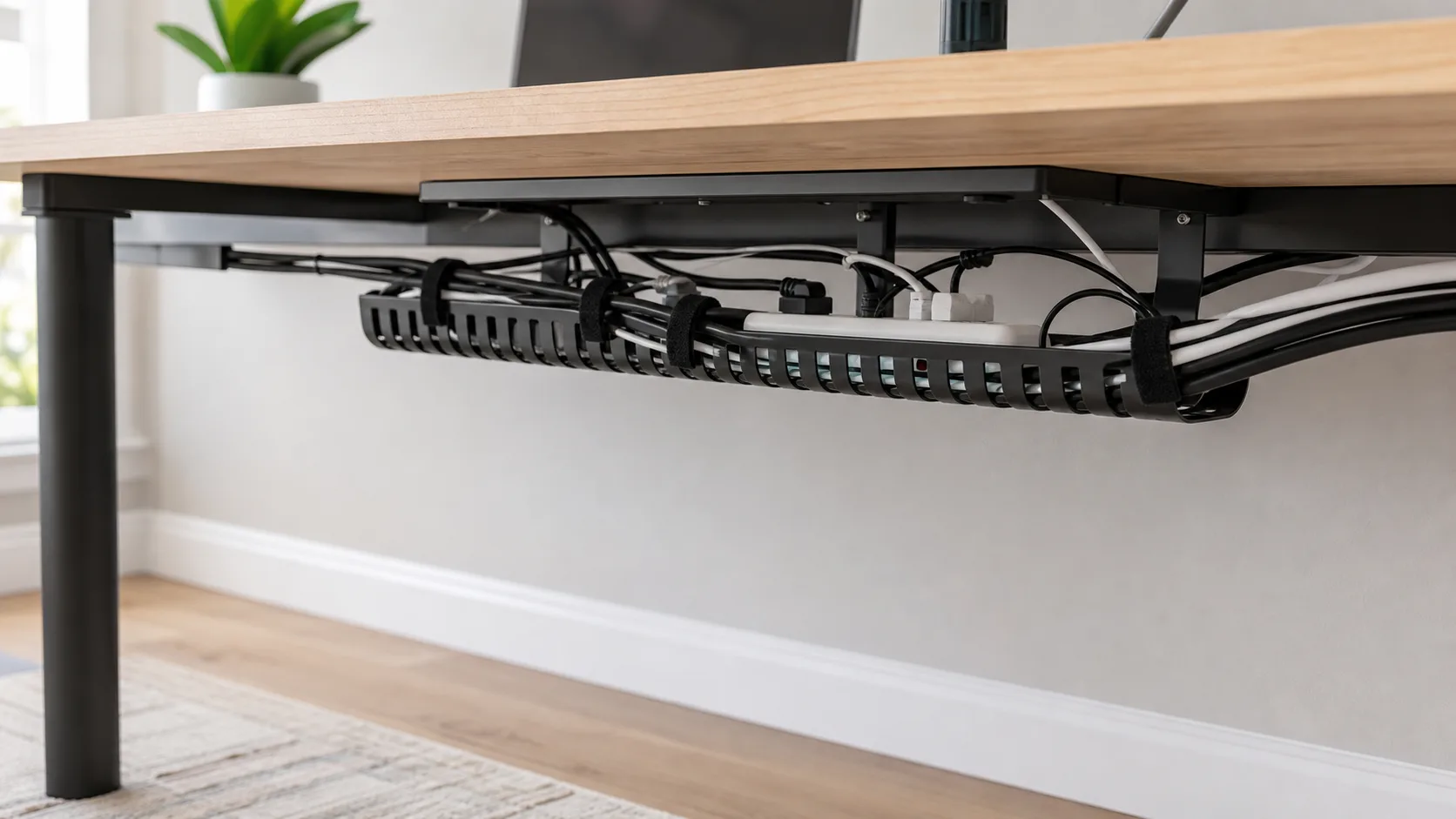
Fix Cables and Power Before You Rearrange Everything
Cables are usually the reason an organised desk still feels messy. You can have a clear desktop and still hate the office because every cable is dangling, stretched, or trapped behind a drawer.
Start with power, not cable clips
Count what needs permanent power: monitor, laptop dock, lamp, printer, speakers, charger, standing desk motor. Then count what needs occasional power: camera battery, headset, phone, power bank, external drive. If you do this after buying clips, you will probably clip the wrong cables in the wrong direction.
For most UK home offices, a six-way surge-protected extension lead costs £10-£25 from Screwfix, Argos or Amazon UK. Mounting it under the desk with heavy-duty hook-and-loop strips can work, but do not overload it and do not bury plugs where you cannot inspect them. If your setup runs warm, hums, or uses high-draw equipment, get the power side right before you make it pretty.
Use a tray for the heavy mess
The IKEA SIGNUM cable trunking is still the cheap one I would buy first for many desks. It is £9 from IKEA UK, 70cm long, and the published maximum load is 10kg. It will not suit glass tops, and hollow-core desktops can be awkward, but for a normal solid desktop it does the boring job well.
Cable sleeves and Velcro ties handle the lighter mess. Avoid permanent zip ties for anything you unplug often. Velcro ties cost about £4-£8 for a multipack and are easier to change when you replace a monitor or dock. Adhesive cable clips are fine for light USB cables, but they do fail on dusty desk undersides, especially near radiators.
If your desk has a monitor arm, route monitor cables down the arm before they enter the tray. That one step often removes the dangling loop you see in video calls. If your clutter problem is really too many small tools and gadgets, the guide to desk accessories you actually need will help you separate useful kit from things that only decorate the problem.
Label both ends
Labelling cables feels fussy until the first time you unplug the wrong black USB-C cable during a call. You do not need a label printer; masking tape and a pen works. A DYMO LetraTag LT-100H costs about £29.72 on Amazon UK at the time checked, and replacement compatible tape is roughly £2.50-£4 per cassette depending on pack size. Buy one if you will label folders, boxes and chargers. Do not buy one just to label two cables.
My practical system is short labels: “MON”, “DOCK”, “LAMP”, “CAM”, “USB HUB”. Full sentences on cable labels are trying too hard. You only need to know what not to pull.
Build a Paper and Admin System You Will Actually Use
Paper clutter survives because most home office filing systems are too worthy. If opening the drawer feels like admin, the paper will sit on the desk. Your New Year reset needs a low-friction system that suits the kind of paper you receive.
Keep only three active paper categories
Do not create 15 folders unless you enjoy filing. Most home workers can run the active desk on three categories:
- Action: anything you must reply to, pay, sign, scan or return.
- Reference: current-year documents you may need soon, such as insurance, warranty paperwork and school or household forms.
- Archive: documents that need keeping but do not need desk access.
Action belongs on the desk or in the top drawer. Reference can live in a magazine file or drawer. Archive belongs somewhere else. If archive documents are on your desk, the desk is doing the loft’s job.
For folders, basic A4 suspension files cost around £8-£15 for a pack of 25, while a small desktop file box is typically £12-£25 from Ryman, WHSmith, Amazon UK or John Lewis. A cheap A4 expanding file for £6-£12 is enough if you only need household admin and tax-year receipts.
Make receipts boring
Receipts are a common failure point because each one feels too small to process. Put a small envelope or pouch in the Action tray and empty it weekly. If you run a small business from the home office, use a dedicated monthly envelope system: “2026-01”, “2026-02”, and so on. It is not glamorous, but it beats hunting through coat pockets in March.
I would not buy a desktop scanner unless paper is a real part of your work. A phone scanning app and cloud folder is enough for most people. If you do need hardware, compact document scanners from Brother, Epson or Canon often sit around £90-£220 in the UK. That only earns its space if it removes a repeated admin problem.
Set one weekly admin appointment
The trick is to process paper before it becomes archaeology. Pick one recurring slot, ideally before the week ends. Friday 4:30pm works because it naturally closes the work week. Ten minutes is enough:
- Empty the action tray: pay, reply, scan or schedule anything that needs a decision.
- File reference items: move documents into the current-year folder or named file.
- Remove rubbish: recycle envelopes, duplicates and packaging inserts.
- Reset the desk: leave only Monday’s first task visible.
If you skip this for two weeks in a row, the system is too hidden or too complicated. Move it closer, reduce the number of categories, or accept that a simple tray beats a beautiful filing cabinet you never open.

Choose Storage That Matches Your Room
Storage advice often ignores the fact that UK home offices are frequently spare bedrooms, box rooms, converted corners or rented spaces. The right storage depends on what you can leave visible and what you can physically change.
Visible storage has to earn its place
Open shelves look tidy only when the items on them are deliberately chosen. Use them for books, a couple of boxes, a plant, and daily tools. Do not use open shelves for random chargers, printer paper and old notebooks unless you are happy looking at them every day.
For small visible items, the IKEA TJENA range is cheap and tidy: magazine files are usually around £2-£4 each, and lidded storage boxes tend to sit around £3-£8 depending on size. John Lewis and Dunelm do nicer fabric or seagrass boxes from about £10-£30 each, but they are decorative storage, not magic.
One thing I have learned from small-flat setups: matching boxes help visually, but clear labels matter more. Three identical grey boxes with no labels are just a guessing game in a nicer outfit.
Hidden storage works for ugly essentials
Printer paper, spare cables, hard drives, tax records and bulky adapters are better hidden. Really Useful 9 litre boxes are a good size for A4 paper and small office kit; ESPO lists the 9L clear box at £5.15 ex VAT, while high-street and marketplace pricing is often closer to £6-£12 per box depending on colour and pack size.
The reason I like clear boxes for hidden storage is not aesthetics. It is because you can see when the box has become a dumping ground. Opaque boxes are calmer visually, but they hide bad habits beautifully.
Drawer dividers are the other cheap win. Expect £6-£15 for adjustable plastic dividers or bamboo trays. Use them for batteries, memory cards, adapters, stamps and spare pens. If a drawer is deeper than about 10cm, use smaller containers inside it; deep drawers without dividers become office junk layers.
Renters need reversible fixes
If you are renting, avoid anything that depends on wall drilling unless your tenancy allows it. Freestanding drawer units, clamp-on monitor arms, adhesive cable clips and under-desk trays are safer bets. The existing home office ideas for renters guide has more layout options; for organisation, the key is making everything removable.
Pegboards can work, but be honest about your tolerance for visual noise. IKEA SKADIS boards look tidy when styled well, but a wall full of exposed cables and accessories can feel busier than a drawer. A small board near the desk for headphones, scissors and charger cables is better than turning the wall into a hardware shop.
Clean Up the Digital Mess Too
A clean desk with a chaotic laptop still feels like a messy office. New year office organisation should include the places where work actually piles up: Downloads, desktop files, browser tabs, bookmarks, screenshots and cloud folders.
Start with the Downloads folder
Open Downloads and sort by date. Delete installers, duplicate PDFs and old screenshots first. Move current documents into a working folder with a clear name, such as “2026 client admin” or “home accounts 2026”. If you cannot decide where something belongs in five seconds, create one temporary folder called “Sort by Friday” and make it visible. Do not create five temporary folders. That is how digital clutter breeds.
For most people, the biggest improvement is changing the browser download setting so it asks where to save each file. It adds one second at the time of download and saves 20 minutes later.
Reset your browser workspace
Bookmarks are only useful when they are faster than search. Keep a bookmarks bar for daily tools and a folder for current projects. Archive the rest. If you have 40 visible bookmarks, you do not have a system; you have tiny anxiety buttons.
Use browser profiles if you mix work and personal accounts. A dedicated work profile keeps bookmarks, passwords, Google accounts and extensions separate. It also reduces the risk of screen-sharing something daft during a call. No judgement, but still.
Back up the boring stuff
Organisation is not only about neatness. It is about reducing risk. Store important documents somewhere that survives a laptop failure: OneDrive, Google Drive, iCloud Drive, Dropbox, or an external SSD. A 1TB portable SSD from Samsung, Crucial or SanDisk is usually about £65-£110 in the UK. You may not need one if cloud storage is already working, but if you handle large video, photo or design files, local backup is still useful.
The important habit is naming. “Invoice_FINAL_v3_reallyfinal.pdf” is not a system. Use dates: “2026-01-14-client-name-invoice.pdf”. Boring filenames are kind to your future self.
Low-Cost Organisation Buys Worth Considering
You can organise a home office with things you already own, but a few cheap purchases can remove friction. I would prioritise function over the matching desk aesthetic.
Budget picks under £15
- Velcro cable ties, £4-£8: better than zip ties for anything you might unplug later.
- IKEA SIGNUM cable trunking, £9: the best cheap under-desk cable tray if your desktop can take it.
- A4 expanding file, £6-£12: enough for household paperwork, warranties and current-year receipts.
- Drawer dividers, £6-£15: the quickest way to stop adapters and pens mixing into one drawer stew.
- Desk tray, £5-£12: only buy one if it has a named job, such as Action or To Scan.
If I had £15 to spend, I would buy cable ties and a single tray before buying decorative storage. Ugly cable mess makes even a clean desk feel unfinished.
Mid-range buys that solve real problems
A label maker is worth it if you have boxes, folders and shared household storage. The DYMO LetraTag LT-100H at about £29.72 is a sensible home option; Bluetooth mini printers such as the Niimbot D11 or Phomemo D30 are often £20-£35 and are nicer if you prefer phone-based labels. Check tape costs before buying, because cheap printers sometimes claw the money back through refills.
A monitor arm can also help organisation because it clears the desk surface. Budget single arms cost about £25-£40, while better gas-spring arms from Ergotron, Humanscale or Fully can be £90-£180. Do not buy an arm until you know your monitor weight and VESA mount size. The monitor size guide will help if your screen setup is also being reviewed.
Premium-ish buys I would not rush
Premium drawer units, designer desk shelves and expensive felt organisers can look excellent, but they are rarely the first fix. A slim Bisley filing cabinet can be £120-£250, and a high-end desk shelf can pass £150. Buy those when you know the system works and you want a nicer permanent version.
The one exception is a good chair or lighting if discomfort is driving clutter. People often sprawl paperwork and devices around because the core setup is awkward. In that case, the organisation problem may really be a comfort problem. The guides to desk lamps for eye comfort and desk chairs under £500 are more relevant than another storage box.
Keep It Organised After January
The best home office system is the one that survives a busy week. If it only works after a full Sunday reset, it is too fragile.
Use a five-minute shutdown
At the end of each working day, do a short reset:
- Clear the centre zone: put away mugs, wrappers, loose notes and anything not needed tomorrow.
- Move paper to Action or Reference: no mystery piles.
- Plug in what needs charging: headset, keyboard, mouse or laptop.
- Write tomorrow’s first task: one line on paper or in your task app.
That last step matters. A tidy desk is nice; a desk that tells you how to restart work is better.
Set a monthly review trigger
The New Year reset should not be a once-a-year rescue mission. Put a 20-minute review in the calendar for the last Friday of each month. Check four things:
- Surface creep: what has started living on the desk without permission?
- Cable creep: have new chargers appeared without routing?
- Paper creep: is the Action tray still actionable?
- Digital creep: are Downloads and desktop files under control?
If the same problem returns twice, change the system rather than blaming yourself. A charger that keeps appearing on the desk needs a permanent cable. Paper that piles up needs a closer tray. A drawer that always overflows needs fewer categories or a bigger container.
Keep one deliberately empty space
Leave a small empty area on the desk or shelf. Not for styling. For life. Every office needs somewhere to put a notebook during a call, open a letter, photograph a receipt or set down a parcel before it moves elsewhere.
This is the part minimal desk photos never show. Real working rooms need a little slack. The aim is not a showroom office; it is a desk that makes Monday morning less irritating.
Frequently Asked Questions
What is the first thing to organise in a home office? Start with the desk surface and power setup. If the centre work area is clear and the right chargers are easy to reach, the room feels more usable immediately.
How much should I spend on home office organisation? Most people can make a big improvement for £20-£50 using cable ties, a tray, drawer dividers and one or two storage boxes. Spend more only when you know what problem the product solves.
Are clear storage boxes better than fabric boxes? Clear boxes are better for hidden storage because you can see what is inside. Fabric boxes look calmer on open shelves but need labels or they become guessing games.
How do I stop paperwork piling up on my desk? Use one visible Action tray and empty it weekly. If the filing system lives too far away or has too many categories, paper will stay on the desk.
What is the best cheap cable management fix? Velcro cable ties are the cheapest useful fix, usually £4-£8. If cables hang under the desk, add a tray such as the £9 IKEA SIGNUM if your desktop is suitable.
How often should I reset my home office? Do a five-minute shutdown daily and a 20-minute review monthly. Waiting until next January lets small clutter become a full-room rescue job.